Mindmarks vs Obsidian: Which Knowledge Graph Tool Fits Your Workflow?
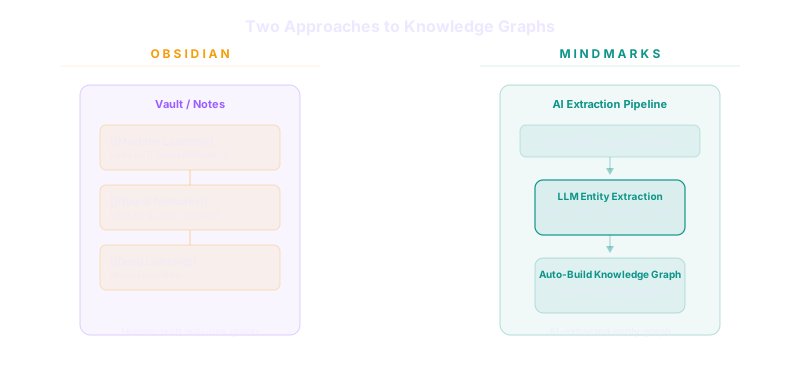
Knowledge management tools have split into two philosophies: automated capture with AI-powered knowledge graphs and manual note-linking with local Markdown files. Mindmarks and Obsidian represent the best of each approach — but they serve fundamentally different workflows.
If you're choosing between Mindmarks (an AI-driven bookmark intelligence platform) and Obsidian (a local-first Markdown knowledge base famous for its [[wiki-links]]), this comparison breaks down exactly where each tool excels, where they overlap, and which one matches how you actually work.

What Is Mindmarks?
Mindmarks is a Chrome extension and web dashboard that automatically captures bookmarks, social media saves, and web content — then transforms them into a searchable knowledge graph using LLM-powered entity extraction.
Instead of manually organizing notes, Mindmarks crawls saved pages, extracts entities, relationships, and factual claims using AI pipelines, and builds a searchable graph you can query conversationally. It combines three retrieval methods: BM25 keyword search, vector similarity search, and entity-based graph traversal.
For a deeper dive into how knowledge graphs work, see our Personal Knowledge Graphs 101 guide.
Core capabilities:
- Multi-source capture: Browser bookmarks, X/Twitter likes, Facebook saves — all ingested automatically
- AI entity extraction: LLMs identify people, organizations, concepts, and relationships from captured content
- Hybrid search: Combines keyword, semantic vector, and entity graph queries
- Conversational Q&A: Ask questions about your saved knowledge with cited answers
- D3.js graph visualization: Interactive knowledge graph showing how captured content connects
- Auto-crawling: Saved URLs are fetched, parsed, and indexed without manual effort
What Is Obsidian?
Obsidian is a free, local-first Markdown note-taking application that stores your notes as plain text .md files in a folder called a "vault." Its signature feature is [[wiki-links]] — double-bracket links that connect notes to each other, forming a personal knowledge graph you build by hand.
Obsidian's philosophy is radical ownership: your notes live on your filesystem in an open format. No cloud dependency, no vendor lock-in, no proprietary database. The app reads and writes standard Markdown files.
Core capabilities:
- Wiki-links: Type
[[note name]]to create bidirectional links between notes - Graph view: Interactive force-directed graph visualizing how your notes connect
- Canvas: Infinite spatial canvas for visual brainstorming with cards and connections
- 1000+ community plugins: Everything from Kanban boards to database views to daily notes
- Local-first storage: Plain Markdown files on your hard drive, always accessible
- Obsidian Sync: Optional E2E-encrypted cloud sync (paid)
- Obsidian Publish: Optional website publishing from your vault (paid)

How Each Tool Builds a Knowledge Graph
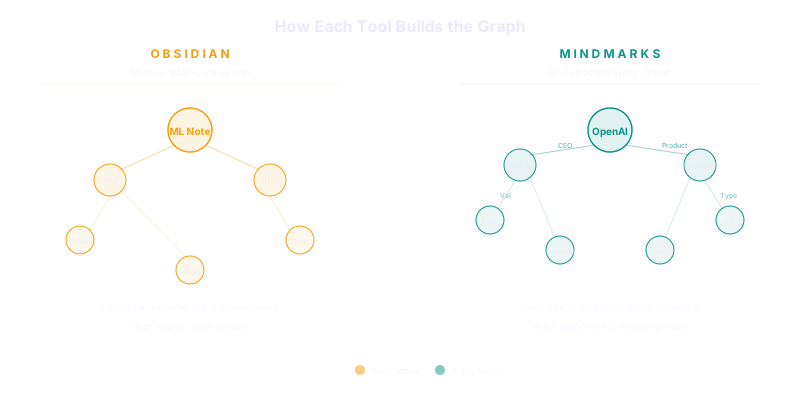
This is the core difference. Both tools create knowledge graphs, but they do it in opposite directions.
Obsidian: Manual Wiki-Link Graph
Obsidian's graph is built through human intention. You write notes, then explicitly link them using [[wiki-links]]. Every connection in the graph represents a deliberate act by you.
This approach has clear strengths:
- High signal-to-noise: Every link exists because you chose to create it. No false connections.
- Deep personal context: Links reflect your mental model, not an algorithm's inference.
- Emergent structure: Over time, clusters and hubs form naturally, revealing patterns in your thinking.
And clear trade-offs:
- Requires discipline: The graph only grows when you actively write and link notes.
- Cold-start problem: A new vault feels empty. The graph becomes useful only after weeks or months of consistent use.
- No auto-discovery: If you forget to link two related notes, the connection simply doesn't exist.
Mindmarks: Automated AI-Extracted Graph
Mindmarks builds its graph through machine intelligence. When you save a bookmark or like a tweet, Mindmarks crawls the content, runs it through LLM pipelines, and automatically extracts:
- Entities: People, organizations, technologies, locations mentioned in the content
- Relationships: How those entities relate to each other ("Company X acquired Startup Y")
- Claims: Verifiable factual statements extracted from the source text
The graph grows with every piece of content you save — no manual linking required.
Strengths:
- Zero-friction graph growth: Save a URL and the graph enriches itself automatically.
- Cross-source connections: A concept mentioned in a tweet gets linked to the same concept in a blog post you bookmarked last month — even if you never made that connection yourself.
- Immediate value: The graph is populated from day one as you import existing bookmarks.
Trade-offs:
- Algorithmic noise: Not every extracted relationship is meaningful. The graph may include low-value connections.
- Less personal framing: Entities are extracted from source text, not from your interpretation of the text.
- Depends on content quality: Poorly written or paywalled sources produce weaker extractions.
Feature-by-Feature Comparison
| Feature | Mindmarks | Obsidian |
|---|---|---|
| Data input | Auto-capture (bookmarks, social saves, URLs) | Manual note writing |
| Linking method | AI-extracted entities and relationships | Manual [[wiki-links]] |
| Knowledge graph | Auto-built from LLM analysis | User-built through linking |
| Graph visualization | D3.js interactive graph | Built-in force-directed graph |
| Search | Hybrid (BM25 + vector + entity) | Built-in search + community plugins |
| Storage | Cloud database (PostgreSQL) | Local Markdown files |
| Data ownership | Your data, cloud-hosted | Your files, on your disk |
| Offline access | No (requires server) | Yes (fully local) |
| Browser integration | Chrome extension for capture | Not a primary use case |
| Social media capture | X/Twitter, Facebook saves | Not supported |
| Conversational Q&A | Yes, with citations | Via community plugins (e.g., Smart Connections) |
| Plugin ecosystem | None (built-in features) | 1000+ community plugins |
| Canvas/whiteboard | No | Yes (Canvas) |
| Publishing | Web dashboard | Obsidian Publish (paid) |
| Sync | Cloud-native | Obsidian Sync (paid) or any file sync |
| Price | Freemium (AgentClan integration) | Free core, paid Sync/Publish |
| Open source | No | No (proprietary app, open format) |
When to Choose Mindmarks
Mindmarks fits workflows centered on consuming and synthesizing web content:
- Researchers who save dozens of articles, papers, and tweets daily and need to find patterns across them without manual organization
- Content creators tracking industry trends across social media and news sites who want AI to surface unexpected connections
- Product teams building competitive intelligence databases from bookmarks, competitor pages, and community discussions
- Investors and analysts who need to query their saved research conversationally ("What did I save about Company X's funding rounds?")
The key value proposition: Mindmarks turns passive bookmarking into an active knowledge base without requiring you to write a single note.
For more on AI-powered bookmark tools, read our guide on AI bookmark managers.
When to Choose Obsidian
Obsidian fits workflows centered on thinking and writing:
- Writers and authors developing ideas over time, connecting thoughts across notes using wiki-links
- Students building a permanent "second brain" of course notes, reading notes, and personal reflections
- Developers documenting technical decisions, architecture notes, and learning journals in Markdown
- Zettelkasten practitioners who follow structured note-linking methodologies
- Privacy-first users who want complete data ownership with zero cloud dependency
The key value proposition: Obsidian gives you a thinking tool that grows more valuable the more you use it, and your notes remain yours forever in an open format.
Can You Use Both?
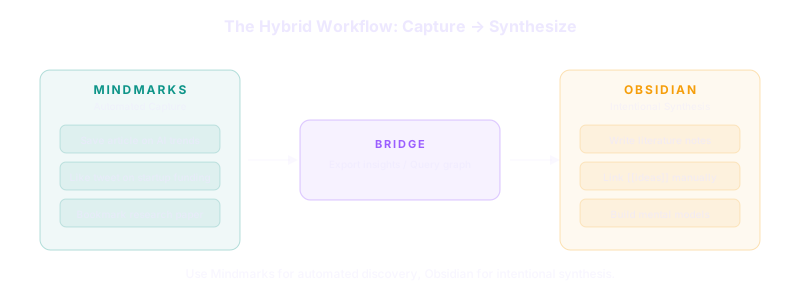
Yes — and many knowledge workers should. The tools complement each other:
- Mindmarks for capture: Save articles, tweets, and web content. Let AI extract entities and surface connections you'd miss.
- Obsidian for synthesis: Write your own notes about what you've learned. Link ideas manually. Build your personal mental model.
- Bridge the gap: Export key Mindmarks insights into Obsidian notes, or use Obsidian to track what you've already processed from your Mindmarks graph.
This hybrid approach gives you automated discovery (Mindmarks) and intentional synthesis (Obsidian) — the best of both worlds.
Technical Architecture Differences
Mindmarks Tech Stack
- Frontend: React 18 with TypeScript, Next.js 14 dashboard
- Backend: Hono framework on Node.js
- Database: PostgreSQL with entity/relationship storage
- Queue: BullMQ with Redis for async crawling and extraction
- Crawling: Playwright for headless browser content extraction
- Graph visualization: D3.js force-directed graph
- AI pipelines: AgentClan for LLM entity/relationship/claim extraction
Obsidian Tech Stack
- App: Electron-based desktop application (Windows, macOS, Linux)
- Mobile: Native iOS and Android apps
- Storage: Plain Markdown files on local filesystem
- Graph: Built-in D3.js-based graph view
- Extensions: Community plugin API (JavaScript)
- Sync: Optional proprietary E2E-encrypted sync service
Making Your Decision
Choose based on your primary input method:
| Your workflow | Pick |
|---|---|
| "I save lots of links and need to find patterns" | Mindmarks |
| "I write lots of notes and need to connect ideas" | Obsidian |
| "I do both" | Use both together |
Choose based on your data priorities:
| Priority | Pick |
|---|---|
| Local-first, offline, full ownership | Obsidian |
| Cloud-native, cross-device, AI-powered | Mindmarks |
| Plugin extensibility and customization | Obsidian |
| Automated intelligence extraction | Mindmarks |
FAQ
Is Mindmarks a replacement for Obsidian?
No. Mindmarks automates knowledge graph construction from captured web content. Obsidian is a note-writing tool for building knowledge graphs manually. They serve different stages of the knowledge workflow — capture (Mindmarks) and synthesis (Obsidian).
Does Obsidian have AI-powered search?
Not natively. Community plugins like Smart Connections add vector search and AI Q&A to Obsidian vaults, but this requires setup and doesn't match Mindmarks' built-in hybrid retrieval (BM25 + vector + entity graph).
Can I export my data from Mindmarks?
Mindmarks stores captured content and extracted knowledge in a structured format. Contact the Mindmarks team for specific export capabilities.
Is Obsidian's graph view the same as a knowledge graph?
Obsidian's graph shows note-to-note connections through wiki-links. It's a navigation and visualization tool. Mindmarks' graph shows extracted entities and their relationships from content — closer to a traditional knowledge graph with typed edges (person, organization, concept, claim).
Which tool is better for academic research?
Both have merit. Use Mindmarks to capture and organize references from the web. Use Obsidian to write literature notes, connect concepts, and build your argument. Researchers often benefit from using both.
Does Mindmarks work offline?
No. Mindmarks requires a server connection for crawling, AI extraction, and search. Obsidian works fully offline since all data is local Markdown files.
Updated April 2026. Features and pricing may have changed since publication.